Transform Your Photos with a Single Click
As a creative professional, you know the struggle: you have a solid photograph, but it lacks that cinematic punch or emotional resonance. Traditional editing involves stacking layers, masking, and endless slider adjustments to achieve a specific mood. The Color Gel Lighting Effect streamlines this entire process. Instead of spending hours manually painting light and color, this tool applies vibrant, artistic color gels to your images instantly. It is designed to bridge the gap between a standard snapshot and high-end visual art, making complex lighting effects accessible to everyone from seasoned graphic designers to small business owners managing their own content.
Understanding the Visual Personality of Color Gels
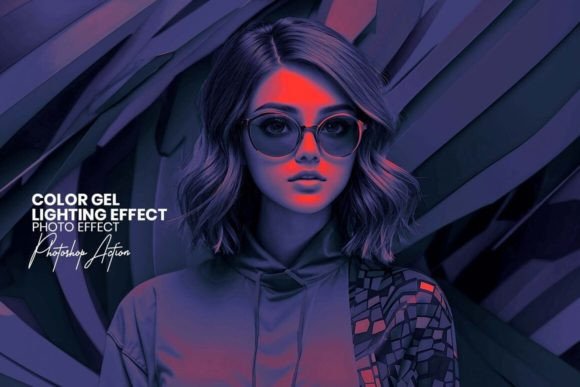
When we talk about a "Color Gel Lighting Effect," we are referring to a specific style of modern typography and visual storytelling. In photography and film, gels are colored transparent sheets placed over light sources to change the hue of the light. This Photoshop action mimics that exact process digitally. The visual characteristics are distinct: you will see rich, saturated colors blending into shadows, often creating a dual-tone or split-tone look. For example, you might see cool cyan highlights meeting warm orange shadows, or a deep magenta wash over a moody blue backdrop.
The personality of this effect is undeniably bold and atmospheric. It transforms flat lighting into something dynamic and three-dimensional. It adds a layer of depth that draws the viewer's eye directly to the subject. Unlike a simple filter that just changes the hue, a high-quality Color Gel Lighting Effect interacts with the luminance of your photo, ensuring that the highlights and shadows retain their texture and detail. This creates a sophisticated aesthetic often seen in album covers, movie posters, and high-fashion editorial design.
Where This Effect Shines: Practical Applications
The versatility of the Color Gel Lighting Effect makes it a valuable addition to any designer's toolkit. Because it relies on a one-click action file (.ATN), it integrates seamlessly into professional workflows. Here is where you will find the most value:
- Social Media Graphics: On platforms like Instagram or TikTok, visual hierarchy is everything. A standard photo might get scrolled past, but an image with dramatic color gels creates an immediate stop-and-stare moment. It is perfect for influencers and content creators looking to establish a consistent, stylized brand identity.
- Music and Entertainment Branding: This effect is practically synonymous with the music industry. Whether you are designing a Spotify playlist cover or a poster for a local gig, the Color Gel Lighting Effect instantly communicates a vibe—be it electric, moody, or retro.
- Web Design and Hero Images: Modern web design relies heavily on striking hero images. Applying this effect to your website’s header can set the tone for the entire user experience, making the site feel more immersive and professionally curated.
- Product Photography: For e-commerce entrepreneurs, standing out is hard. If you are selling tech gadgets, cosmetics, or lifestyle products, adding a subtle color gel can make the product look premium and futuristic without physically altering the item.
Enhancing Brand Perception and Engagement
Visuals drive emotion, and emotion drives decisions. When you utilize the Color Gel Lighting Effect, you are doing more than just editing a photo; you are curating a feeling. Color psychology plays a massive role here. Cool blues and purples can evoke trust, calm, or mystery, while warm reds and yellows convey energy, passion, and urgency.
By consistently using this style in your marketing materials, you strengthen your brand recognition. Audiences begin to associate that specific color grading with your content. It signals professionalism and attention to detail. Instead of using generic stock imagery that looks like everyone else’s, you create a custom visual language. This leads to higher engagement rates because the content feels unique and intentional. It is a subtle form of visual hierarchy—guiding the viewer’s eye to the most important part of the image through color contrast and light.
Practical Guide: Integrating the Action into Your Workflow
Adopting new design assets should be about efficiency and quality. The Color Gel Lighting Effect Photoshop Action is built to be user-friendly, but getting the best results requires a bit of strategy.
1. Choosing the Right Source Image
Not every photo works equally well. For the best results, start with an image that has decent contrast and clear subjects. Photos with a lot of mid-tone grays or flat lighting can sometimes look muddy with heavy effects, though this action includes 20+ unique color adjustments to help you fine-tune the result. High-contrast images, portraits with distinct light sources, or architectural shots with clear lines tend to react beautifully to color gels.
2. Evaluating the Settings
One of the standout features of this file is the Unlimited Effects Combined Setting Possibility. Once the action runs, you are presented with a layer structure that allows you to tweak the intensity. You don't have to settle for the default "one-click" look. You can lower the opacity of the gel, mask it out of certain areas (like a subject's face to keep skin tones natural), or swap the colors to match your brand palette.
3. Testing and Pairing
If you are using this for a campaign that involves text—such as a poster or a thumbnail—consider how the lighting effect interacts with your typography. A busy, multi-colored background can clash with a script font or a detailed serif font. In these cases, it is often best to use a clean sans serif font with a solid drop shadow or a knockout shape to ensure readability. The goal is to use the Color Gel Lighting Effect to support the message, not overshadow it.
Final Thoughts on Professional Polish
In the crowded digital landscape, the difference between amateur and professional often comes down to post-production. You don't need to be a retouching wizard to achieve studio-quality lighting. By leveraging the Color Gel Lighting Effect, you save time and gain access to a high-end aesthetic that usually requires expensive lighting rigs. It is a practical, powerful tool for anyone serious about their visual content, offering a straightforward path to photos that truly pop.