Ocean Coral Procreate Color Palette: A Deep Dive for Digital Artists
There’s a specific feeling you get when you find a color palette that just clicks. It’s the moment when a creative project stops feeling like a chore and starts flowing naturally. For digital artists and designers working on the iPad, the Ocean Coral Procreate Color Palette is one of those tools that can genuinely shift your workflow. It’s not just a random collection of swatches; it’s a curated environment designed to evoke the serene yet vibrant energy of a coastal sunset meeting the deep sea.
Defining the Visual Identity
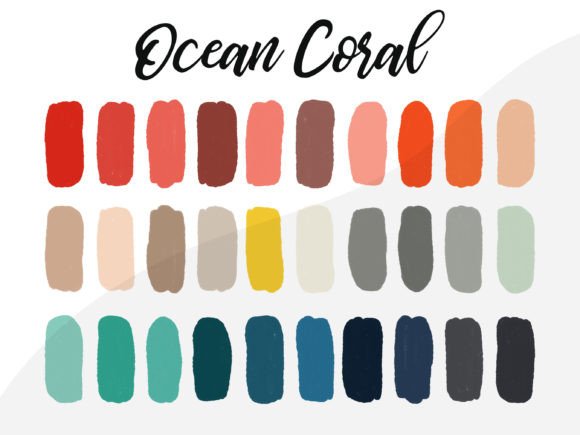
Understanding the personality of a color palette is just as important as understanding the mechanics of a font. The Ocean Coral Procreate Color Palette bridges the gap between warmth and coolness. You are looking at a blend of soft, blush pinks and terracottas mixed with deep teals, navy blues, and seafoam greens. This isn't a flat, one-note collection. It offers a range of values—from light highlights perfect for skin tones or backgrounds to dark, moody shades ideal for text overlays or shadows.
The appeal lies in its versatility within a specific aesthetic. If you are working on a brand identity for a wellness coach, a boutique hotel, or a sustainable beauty brand, these colors communicate trust, calm, and natural elegance. It fits perfectly into the modern design landscape where audiences crave authenticity over the neon, high-saturation gradients of the past decade.
Practical Applications for Creatives and Entrepreneurs
As a designer or content creator, your time is split between creation and strategy. A pre-made palette like this eliminates the guesswork of color theory, allowing you to focus on composition. Here is how different professionals can leverage these swatches:
- Social Media Graphics: Consistency is key on platforms like Instagram and Pinterest. Using the Ocean Coral palette ensures your grid looks cohesive. The teal and coral combination is particularly effective for creating contrast that stops the scroll without being jarring.
- Editorial Design & Blogging: If you are designing blog headers or lead magnets, these colors provide a sophisticated backdrop. They are "friendly" colors that don't strain the eyes, making them excellent for background fills or accent borders in web design.
- Digital Illustration: For Procreate users drawing portraits or landscapes, this palette offers realistic skin tone undertones and atmospheric perspective options. The darker blues work beautifully for depth, while the corals bring life to focal points.
- Packaging Design: Small business owners creating packaging design for physical goods will find that these colors translate well to print, particularly on matte finishes where the subtlety of the shades can shine.
Integrating the Palette into Your Workflow
One of the biggest hurdles with digital design assets is the installation process. Fortunately, getting this palette into your software is straightforward. You aren't downloading a complex premium font that requires managing multiple weights or licensing files; you are importing a simple data set of colors.
How to Import the Palette to Procreate
The file you receive is a .swatches file, which is the native format for Procreate. This ensures that the color values remain accurate to the creator's intent. Here is the step-by-step process to get started:
- Navigate to the "Downloads" folder on your iPad or the specific location where you saved the file.
- Simply press on the .swatches file.
- The Color Palette should automatically import to Procreate.
- You will find your new Color Palette at the bottom of your Color Palette Menu.
- To access it, press the circle on the top right-hand corner of your Procreate interface. In the drop-down menu, you will see five buttons; the last one is ‘Palettes’. Your new Ocean Coral colors will be waiting there.
It is worth noting that this file is only compatible with the PROCREATE APP on the iPad. If you are working in Adobe Fresco or Photoshop on a desktop, you will need to manually input the hex codes if the creator provided them separately, but for the iPad-native workflow, this is a plug-and-play solution.
Strategic Color Usage for Brand Perception
Color psychology is a massive component of marketing and logo design. When you choose a palette, you are choosing the emotional language of your project. The Ocean Coral palette leans heavily into "approachable professionalism." It doesn't scream for attention like a neon yellow, nor is it as stark and cold as a pure monochrome scheme.
For entrepreneurs and marketers, this balance is crucial. You want your visual assets to feel high-quality and curated (hence the "premium" feel of the palette) but also relatable. When pairing this palette with typography—whether you are using a sans serif font for clean headers or a script font for elegant accents—ensure the contrast is sufficient. For example, the deep navy blue in this palette pairs exceptionally well with white or cream text, ensuring high readability on digital screens.
Evaluating Project Fit
Before committing to any color palette, ask yourself if it matches the "voice" of the project. The Ocean Coral palette is ideal for:
- Lifestyle & Wellness: Yoga studios, meditation apps, and health blogs.
- Creative Services: Photographers, interior designers, and florists.
- Seasonal Campaigns: It works beautifully for spring and summer marketing campaigns but can be adjusted with the darker tones for autumn vibes.
It might be less suitable for aggressive, high-energy corporate finance or heavy metal band merch, simply because the vibe is too organic and soothing. Always match the tool to the message.
Final Thoughts on Design Assets
In the world of digital art, having a library of reliable design assets saves you hours of frustration. The Ocean Coral Procreate Color Palette is more than just a set of dots on a color wheel; it is a mood board compressed into a functional tool. Whether you are a hobbyist sketching on the couch or a professional designer meeting a client deadline, having a harmonious set of colors ready to go allows you to work faster and with more confidence.
By focusing on the practical application—importing the file, understanding the color relationships, and applying them to the right project type—you turn a simple download into a powerful component of your creative toolkit. It is a reminder that good design often starts with a solid foundation, and in digital illustration, that foundation is color.